
 Waqar Hussain
Most websites have a ranking problem they could fix in one afternoon. They just don’t know it yet.
You publish a strong page. You wait. Nothing happens. Meanwhile, dozens of older pages on your own site talk about the same topic and never link to it, so Google sees a lonely page with no votes from its own neighbors and quietly moves on.
So, does internal linking help SEO? Yes. A lot. Internal linking SEO is the one lever you control from start to finish. No outreach, no budget, and no waiting for some site owner to answer your email. In this guide, you’ll learn what internal links are, how they help you rank and get cited by AI tools, the best practices we use on client sites, and one Google search that finds link spots in under a minute. Since the term topical authority was established in the SEO industry, the concept has relied mostly on internal linking SEO.
What Is Internal Linking SEO?
An internal link is any link from one page on your site to another page on the same site. That’s it. If your post about running shoes links to your page about running socks, you’ve made an internal link.
People type “what is internal linking” (or even “what is internal links”) into Google and expect a hard answer. It isn’t hard. You already use internal links every day. Your menu is full of them. So is your footer, your logo, which usually links back to your homepage, and those “related posts” boxes at the end of articles.
Here’s a simple internal link example. Say you run a bakery website. Your post called “How to Keep Bread Fresh” mentions sourdough, so you turn that word into a link to your sourdough loaf page. A curious reader clicks through. Google follows the same path, and now it has one more clue that the loaf page matters and that it’s about sourdough.
Internal Links vs Backlinks
Linking in SEO comes in two main flavors, and people mix them up all the time. A backlink comes from another website and points to yours. An internal link stays inside your own domain.
Backlinks bring new authority in from the outside world. Internal links decide where that authority goes once it arrives.
Think of it like a house. Backlinks are the water main coming in from the street. Internal links are the pipes inside the walls. Great pressure at the street means very little if the pipes never reach the upstairs bathroom.
How Does Internal Linking Help SEO?
Google has said for years that links are one of the main ways it finds and understands pages, and that includes the links inside your own site. The bond between internal linking and SEO comes down to four things, plus a fifth that’s growing fast: AI search.
Google Finds Your Pages Faster
Googlebot gets around by following links. It lands on a page, reads it, then follows every link it can find to reach pages it hasn’t seen before. Simple.
A page with no internal links pointing to it is called an orphan page. Google might still find it through your sitemap, but it gets far less attention, and it can sit in the “Discovered, currently not indexed” pile for weeks. When you publish something new and link to it from three or four pages that Google already visits often, you hand the crawler a direct road. New pages tend to get picked up much sooner that way.
Google Learns What Each Page Is About
The words you click on matter. They’re called anchor text. If ten pages on your site link to one URL using words like “SEO audit checklist,” Google gets a strong hint about that page before it even reads a line of it.
The words around the link help too. A link sitting inside a paragraph about site speed tells Google the target page has something to do with site speed. Context is a signal, and with internal links, you control all of it.
Authority Flows to the Pages That Matter
Every page on your site holds some ranking strength. Some comes from backlinks. Some comes from age. A big part comes from how many other pages link to it, because every link hands over a share of the linking page’s strength.
SEO’s call this link equity. Google’s original name for it was PageRank, and Google has confirmed over the years that an updated form is still part of the mix. It’s why your homepage almost always ranks for your brand name. Nearly every page links back to it. Use the same logic on purpose, and point more internal links at your money pages so they get a bigger slice of the pie.
Readers Stay Longer and Buy More
Internal links aren’t just for robots. A reader who finishes a post and spots a link to a deeper guide will often click it. Then another one. Every extra page they view is one more chance to earn their trust, get their email, or make a sale.
Here’s a pattern that shows up in audit after audit. A service page gets almost no traffic for months, then starts pulling in leads once a few popular blog posts link to it. Nothing on the page itself changed. Only the path to it did.
Does Internal Linking Help You Get Cited by AI?
Yes. And most guides on this topic haven’t caught up yet.
Ask Google’s AI Overviews, AI Mode, ChatGPT, or Perplexity a question, and the answer usually comes with a few source links. Those are AI citations. Each one puts your brand in front of a reader who’s already curious, which is why sites now chase them the way they once chased the top spot on page one.
Internal links can’t win those spots alone. What they do is more basic: they help AI tools find, understand, and trust the right page on your site.
AI Can’t Cite a Page It Never Found
Google keeps this simple. Its guide to AI features says a page only needs to be indexed and eligible to show with a snippet to appear as a supporting link in AI Overviews or AI Mode. There’s no secret extra step. On that same page, Google names internal links as one of the basics that still matter for being found.
The chain is short. Weak internal links lead to weak crawling. Weak crawling leads to pages that never get indexed. And a page that isn’t indexed can’t be cited.
Topic Clusters Cover the Hidden Questions
Google also says its AI features may use something called query fan-out. In plain words, the AI quietly runs a bunch of smaller searches on the parts of a question, then blends the results into one answer.
Say someone asks how to speed up a slow website. Behind the scenes, the AI might also look up image sizes, caching, and hosting. A pillar page linked to cluster pages on each of those gives you a strong page for every one of those side searches. A lone blog post gets one shot. A linked cluster gets several.
Clear Anchors Point AI to Your Best Page
AI tools try to pick the single best source on a topic. If twelve of your pages link to one guide using the words “site speed checklist,” you’ve made that pick easy.
Mixed signals do the opposite. When one phrase points to three different pages, the AI can’t tell which one you stand behind, so it may cite your weakest page, or skip you for a competitor.
Keep Key Links in Plain HTML
This one catches people off guard. When Vercel studied AI crawler traffic in late 2024, it found that none of the major AI crawlers, including GPTBot, ClaudeBot, and PerplexityBot, ran JavaScript. They read the HTML your server sends. That’s it.
So if your menu or “related posts” links only show up after JavaScript loads, those bots may never see them. Google can render JavaScript. Don’t assume every AI crawler can. Build important links as normal HTML, and ask your developer to render main content on the server.
Our guide to GEO vs SEO vs AEO explains how this new kind of search works. AI-friendly site structure is also a core part of our AI SEO services, or you can have our AI SEO consultant map it out for you.
Not All Internal Links Are Equal
Your site has several kinds of internal links. Google doesn’t treat them all the same.
Navigation links sit in your main menu and show up on every page, so they help Google learn your site’s main sections. Footer links appear sitewide too. That’s exactly why they count for less, since a link sitting in the same spot on 2,000 pages looks like a template rather than a choice.
Breadcrumbs show the trail from your homepage to the page you’re on, like Home > Blog > SEO > Internal Links. They’re great for structure, and they help readers step back a level when they want to.
Then you have contextual links. These live inside the body of your content, wrapped in real sentences, and they’re the most valuable internal links you can build. Why? Because they look like an editor’s choice. Somebody decided this link was useful right here, in this exact sentence. Google’s systems have long tried to guess how likely a real person is to click a given link, and a link in the middle of a helpful paragraph wins that contest against a footer link every time.
So when we talk about internal link SEO best practices below, we mostly mean contextual links.
The Most Underrated Internal Linking Hack: One Google Search
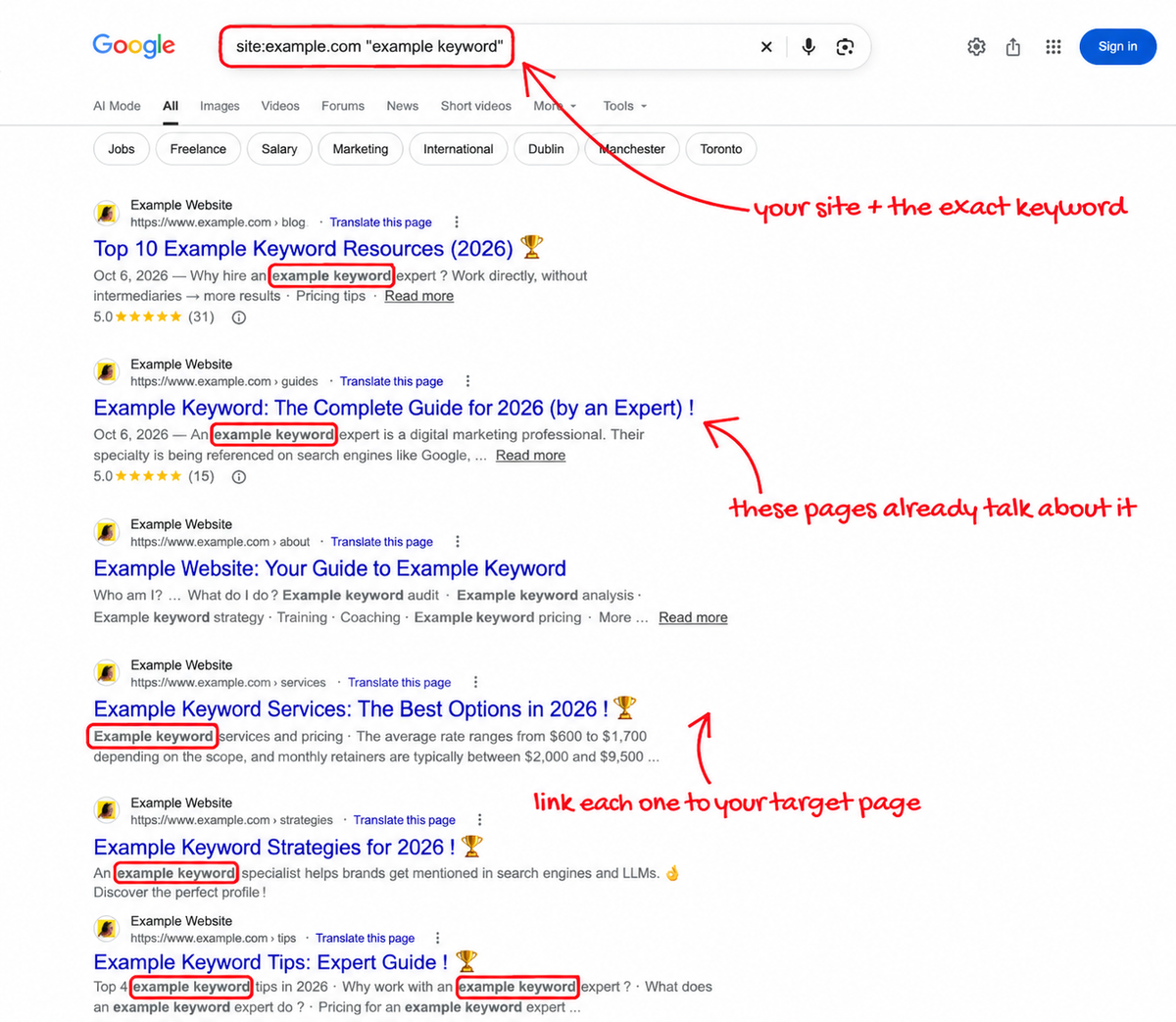
If you’re wondering how to do internal linking without a big tool budget, start here. This is the method we come back to again and again, because it costs nothing and works on almost any site. No crawler. No plugin. Just Google.
Type site: followed by your domain, then your keyword in quotes. Like this:
site:example.com "example keyword"
Every result Google shows you is a page on your site that already talks about the topic. And a page that already mentions your keyword is a page that should link to the one you’re trying to rank. You aren’t forcing anything in. The sentence is already sitting there, waiting for a link.
Step 1: Pick the Page You Want to Boost
Start with one page. Choose something that matters to your business, like a service page, a product category, or a guide stuck on page two of Google. Then write down the exact keyword you want that page to rank for.
Be specific. “Roof repair Dallas” beats “roofing” by a mile.
Step 2: Run the Search With the Exact Keyword
Open Google and type the search using your domain and that exact phrase in quotes. The quotes matter more than you’d think. Leave them off, and Google shows loose matches, so you end up with pages that only mention one of your words.
For a page about keyword research, you’d type site:example.com "keyword research" and get back every page that uses that exact phrase.
Step 3: Turn the Mention Into a Link
Open each result. Find the sentence that mentions your keyword. Now turn those words into a link to your target page, using the exact keyword as your anchor text wherever it reads naturally.
Skip any page where the link would feel forced. Also skip the target page itself, which will often show up in the list.
Step 4: Aim for at Least Five Links in the Body Text
Try to add at least five of these links. Put every single one inside the main body text, never in the footer and never in a sidebar widget, since body links tend to carry the most weight with Google and they’re the ones real readers actually click.
That’s the whole method. Zero tools, and it’s the cheapest lever in SEO.
Make the Search Even Sharper
A few tweaks help. First, hide the target page from your results by adding a minus sign and inurl: with part of its address, like site:example.com "keyword research" -inurl:keyword-research-guide. Now every result is a real chance to add a link.
Second, search again with close variations like the plural, a synonym, or a longer phrase, since “keyword research tool” might turn up pages your first search missed. Bonus: your anchors stop looking like clones.
Third, know the limits. Google’s site: search doesn’t show every indexed page, and on big sites it can miss a lot, so treat it as a quick-win tool and back it up with a full crawl. One last check before you add a link: make sure the page doesn’t already link to your target. A second link from the same page adds little.
12 SEO Internal Linking Best Practices
The site: trick finds the spots. These twelve rules decide how hard each link actually works for you once it’s in place.
1. Write Anchor Text That Describes the Page
Anchor text should tell the reader, and Google, what’s waiting after the click. “Click here” and “read more” say nothing at all. “Our guide to local SEO for dentists” says plenty.
Exact-match anchors are much safer inside your own site than they are in backlinks. Still, don’t paste the same phrase onto every link. Mix in natural variations. A real writer wouldn’t repeat themselves 40 times in a row, so your links shouldn’t either.
2. Link From Pages That Already Have Power
A link from a page with backlinks and steady traffic passes more value than a link from a post nobody reads. Open Google Search Console, sort your pages by clicks, and look for strong pages that relate to your target. Those are your best donors.
Most people skip this and link from whatever page happens to be open. Start with the strong ones.
3. Keep Key Pages Within Three Clicks
Click depth means the number of clicks it takes to get from your homepage to a given page. Keep the important ones three clicks deep or less. Pages buried deeper tend to get crawled less often, and they usually carry less weight when Google decides what to rank.
Is your best service page five clicks away? Fix it. Link to it from your homepage, a main category page, or a popular post.
4. Build Topic Clusters Around a Pillar Page
A topic cluster is a group of pages on one subject. One broad “pillar” page covers the whole topic. Several smaller pages each dig into one part of it.
The pillar links out to every cluster page, and every cluster page links back to the pillar. This shows Google you cover the topic in full, and it stops your own pages from fighting each other for the same keyword. Planning clusters like this is a big part of strong SEO content writing, because the links get mapped out before a single word is written.
5. Place Links Early, Inside Real Sentences
Links near the top of a page tend to get more clicks, and many SEOs believe they carry a little more weight, too. You don’t need to cram links into your first line. Just don’t save them all for the end.
Wrap each link in a sentence that tells the reader why it’s there and what they’ll get if they click, because a link with context beats a bare link every time.
6. Don’t Overload Any Single Page
There’s no magic number. Google dropped its old advice of about 100 links per page years ago. But every extra link splits the value a page passes along, and a paragraph with six links crammed into it is a pain to read.
Here’s a useful test: would a reader actually want to click this? If not, cut it. For a 1,500-word post, somewhere between five and fifteen contextual links is a sane range for most sites.
7. Find and Fix Orphan Pages
An orphan page has no internal links pointing to it. Zero. To find them, run a crawl, compare the pages it reaches with the pages in your sitemap, and look for anything that only shows up in the sitemap. Then link to it, or remove it if it’s useless.
8. Don’t Nofollow Your Own Links
Some site owners add rel=”nofollow” to internal links, hoping to push more value toward other pages. This old trick, known as PageRank sculpting, stopped working a long time ago. Now it just wastes value and can slow down how Google finds your pages. Leave your internal links as normal, followable links.
9. Use Real HTML Links Google Can Follow
Google follows links built with a standard <a> tag and an href attribute. Links made only with JavaScript click events, or buttons with no href, may never get followed at all. This trips up a lot of modern sites built on heavy JavaScript frameworks, where the menu looks fine to people and still shows Google nothing it can follow.
It matters even more for AI crawlers, which may not run JavaScript at all. Not sure about yours? A technical SEO review will tell you fast.
10. Point Every Link at the Final URL
Each internal link should go straight to the live, final version of a page. Every redirect in between adds a delay.
Old http:// links are the classic culprit after a site moves to https, and they often hide in blog posts nobody has touched in years. Test any address with our free HTTP to HTTPS checker, then fix the link at the source.
11. Don’t Send Links to Pages You’ve Hidden
It sounds obvious. It happens all the time anyway. A page gets a noindex tag during a redesign, nobody takes it off, and 30 internal links keep pointing at a page Google has been told to ignore.
Run any doubtful page through our noindex checker before you build links to it. While you’re there, make sure the target page has a clear title and description. Our meta tag checker does that in seconds.
12. Go Back and Update Old Posts
Every time you publish a new page, older pages should link to it. Most people link from the new post back to old ones and stop there, which leaves the new page standing alone.
Make it a habit. Publish the page, run the site: search, then add internal links in your content from at least three to five older pages that same day.
How to Check Internal Links on Your Website
You can’t fix what you can’t see. Once a quarter, run a proper internal links check. Here’s what to use and what to look for.
Free Ways to Check Internal Links
Google Search Console has a Links report, and it’s free. It shows which of your pages get the most internal links. If your key service page sits near the bottom of that list while a forgotten blog post from 2019 sits near the top, your structure is upside down.
For one page at a time, a simple page link checker or browser extension lists every link and flags the broken ones. Handy before you hit publish.
When You Need an Internal Link Checker Tool
For any site bigger than a few dozen pages, you’ll want a crawler. An internal linking checker like Screaming Frog, Sitebulb, or the site audit inside Semrush or Ahrefs will crawl your whole site the way Google does.
A good internal link analyzer tool will show you broken links that return a 404 error, redirect chains, orphan pages, the click depth of every URL, and how many internal links each page receives. Sort that last column from low to high. The pages near the bottom that also matter to your business are your first targets.
What does healthy look like? Your most important pages get the most internal links, and none of them sits deeper than three clicks. Broken links: zero. Redirects are rare, and every page you want indexed has at least a few links pointing at it.
Want someone else to check website internal links for you and hand over a clear, ranked fix list? That’s part of our on-page SEO services.
An Example of Internal Linking You Can Copy
Picture a small accounting firm. Their most valuable page, “Small Business Tax Preparation,” gets almost no traffic, while a few of their 40 blog posts pull in steady visits, like “Which Business Expenses Can You Deduct?” and “Quarterly Taxes Explained.”
So they make a plan. First, they search site:theirfirm.com "tax preparation" and find nine posts that mention the phrase. They turn the mention in each one into a link to the service page. Next, they make the service page a pillar that links out to the deductions post, the quarterly taxes post, and a new post on tax deadlines, and each of those links back. Then they add the service page to the main menu, so it sits one click from the homepage. Last, they run a crawler over the site and fix two links that still pointed at an old HTTP address.
The whole job fits in one afternoon, which is what makes internal linking for SEO such a good deal. Nobody’s permission needed. No budget either.
Internal Linking SEO Mistakes We See in Almost Every Audit
Footer stuffing comes first. Some sites jam 50 keyword links into the footer and hope for a boost, but search engines have given boilerplate footer links little weight for years, so all that effort looks spammy and does next to nothing.
Another is pointing one anchor at different pages. If “SEO audit” links to your service page in one post and to a blog post in another, you’re sending Google mixed signals about which page should rank. Pick one target for each main keyword. Stick to it.
Then there are auto-linking plugins left running at full blast. A plugin that turns every mention of a keyword into a link can create dozens of links per page, many in strange spots. Use them with care, or skip them.
People also delete or merge pages and forget the links that pointed to them, which then break or redirect.
And the biggest one? Linking for Google instead of for people. If a link wouldn’t help a reader, it probably isn’t helping you rank, either. The best internal links answer the next question a reader is about to ask.
On large sites, these mistakes multiply fast. A store with 50,000 product pages can’t fix links by hand, which is where enterprise SEO planning comes in. Software brands hit the same wall as their docs, feature pages, and blog drift apart, which is one reason we offer a dedicated enterprise SaaS SEO service.
Internal Links Share Authority. Off-Page SEO Brings It In.
Most guides skip this part about internal links. SEO value from internal linking can only share the strength your site already has, so if your whole domain is weak, shuffling that strength around helps only so far.
That’s where off-page SEO steps in. Good backlinks, brand mentions, and citations bring fresh authority into your site, and your internal links carry it to the pages that need it most.
Foundational listings on directory submission sites and profile creation websites help build steady brand signals. Software companies can win early discovery from SaaS directories. Even document sharing sites and image sharing sites can add mentions and links when you use them with a plan. Then, when those links land on your homepage or a popular guide, a smart internal structure moves that value straight to your service and product pages.
Frequently Asked Questions
What is an internal link in SEO, in simple words?
It’s a clickable link from one page on your site to another page on the same site. Visitors use it to move around. Google uses it to find your pages and work out what they’re about.
How many internal links should a blog post have?
There’s no fixed rule. Most posts do well with five to fifteen contextual links, depending on length. Add a link when it truly helps the reader, and stop when the page starts to feel crowded.
Can internal links hurt my SEO?
Rarely on their own. Trouble comes from broken links, long redirect chains, one keyword pointing at several pages, or links stuffed where they make no sense. Fix those, and internal links are close to risk-free.
Do internal links help with AI Overviews and ChatGPT citations?
They help, mostly behind the scenes. Internal links get your pages crawled and indexed, show which page is your main source on each topic, and give AI tools more matching pages to pull from. Pair them with a clear, short answer near the top of each page.
How often should I check my internal links?
Do a full crawl once a quarter. Also run a quick check any time you delete, move, or merge a page, since that’s when most broken links show up.
Want Us to Build Your Internal Linking SEO Strategy?
Internal linking SEO isn’t flashy. It won’t make anyone’s highlight reel. Yet it’s one of the few parts of SEO you fully control, and it often moves rankings faster than months of brand-new content.
Start with one page today. Run the site: search, add five body links, and watch what happens over the next few weeks.
If you want to hire us for your SEO Interlinking Strategy or for an off-page campaign, contact us at info@serpmaestro.com. You can also book a consultation, see our full range of SEO services, learn more about SERP Maestro, or keep reading on the SERP Maestro blog.

Waqar Hussain
Waqar Hussain is the founder of SERP Maestro and author of SEO for Entrepreneurs. He holds an MBA from the Australian Institute of Business and works as an SEO and AI search consultant, helping ecommerce, SaaS, and service brands turn organic search into predictable, scalable revenue. His recent work includes growing an ecommerce brand to 88.4K organic clicks and 4.92M impressions in six months, and earning brand citations inside ChatGPT and other answer engines.